“I said what needs to be said, not what you want to hear.” — Unknown
“The present gallops away with clattering feet, while the future steals noiselessly upon us.” — James Lendall Basford
“We require from buildings, as from men, two kinds of goodness: first, the doing their practical duty well: then that they be graceful and pleasing in doing it; which last is itself another form of duty.” — John Ruskin, The Stones of Venice, 1880
“A bee is never as busy as it seems; it’s just that it can’t buzz any slower.” — Kin Hubbard
Thousands and thousands of quotes delivered since 2011!
**********
All original content on this blog is copyrighted by Jeffrey B. Ross with ALL Rights Reserved. While reference links back to JBRish.comare appreciated and encouraged, please acquire approval for any reproduction of original content from this website.
One of the reasons to consider a Fuji camera is the ongoing support Fuji offers its users. Some camera manufacturers sell their camera to someone and unless there is a major problem, the firmware rarely gets updated.
Fuji, on the other hand, continues to support their buyers by improving the performance of their cameras by updating the software often with new capabilities. Yes, of course they use updates to correct poor performance or problems, but they don’t stop there.
Last week I learned that my relatively new Fuji X-T2 was eligible for a firmware update. I updated the firmware once before, but I couldn’t remember exactly how to do it and believe me, this is one area where nobody wants to make a mistake. I discovered that there are more warnings than a photographer can shake a stick at while I was reviewing the correct procedure.
I did what most people would do under the circumstance, and I went to the web to determine the best procedure.
Here is the procedure I used: (I give official documentation at the end and I would suggest your read that as well as watching the video.) I found comfort in reviewing the correct procedure from different sources just to make sure I understood it completely.
NOTE: There seem to be many steps, but it is easier than it appears. Just take your time and follow the instructions carefully. Please read this entire web page and information at the links before proceeding. It will give you confidence!
1. I visited the Fuji firmware update page and located the latest firmware upgrade for my camera which was represented by the entry in the table on that web page:
2. Since I knew I needed the update, I clicked on the Firmware-Download link and checked all the necessary agreements!
3. The file, FWUP0010.DAT, was waiting for me in my downloads folder. I could see that it was 53.5 MB
4. The next thing needed is a newly formatted memory card. There are couple of ways to do this. P. 203 of the User’s Manual provides the basic outline**:
A. – Press the Menu button on the back of the camera and select User Setting (the wrench) –> Format
B – Choose the slot that has the memory card you want to use and press MENU/OK.
C – You have to confirm the choice. Naturally, all data on the card will be erased and lost so make sure there isn’t anything on the card that you will need. You can always select CANCEL at this point if you are unsure.
D – If you are sure you want to format the card, choose OK and let the camera do its work.
** Fuji owner’s manual
5. Once the card is formatted correctly, insert it into your computer and copy the .DAT file recently saved as the Fuji firmware download. Don’t change the name of the file or do anything to it other than copy it to the card.
NOTE – The copied file needs to be in the main directory or root directory of the card. It should not be in a folder and technically, it should be the only thing on the card! (Just drag and drop it onto the newly formatted card and you will be fine)
6. Eject the card from your computer and carefully insert it into the camera.
7. Fuji warns users to make sure they are using a fully charged battery. You can insert the battery into your camera to check the power level. Make sure it is fully charged.
NOTE: Firmware updates can take some time. You never want to interrupt an update so be careful in handling the camera so that it is not turned off or disturbed in any way. I just put it down with the screen facing me and let it go through the paces. Fuji suggests that the update can take up to 90 seconds. When waiting for the process to complete, it may seem like a long time, but let it run through the steps. You will be notified when the process is completed.
8. With the camera turned off, press and hold the DISP/BACK button while turning the camera on. You should see a menu indicating the firmware version. It may give both a body and lens version. Now you can let go of the button.
9. Make sure BODY is selected and press the OK button on the back of the camera. Pressing the up button should highlight the word “OK.” DO NOT SELECT LENS as this upgrade is for the body’s firmware only.
10. Press the OK button and the camera will update the firmware. When the update is complete, the screen will show the current firmware (updated) version.
11. Fuji recommends that you turn off the camera at this point and check the firmware version; good idea. (see step 8 above). It should list the updated version.
12. Fuji also suggests that once you have checked the firmware version and the upgrade has been successful, you should reformat the memory card so that it can be used for photos and doesn’t become a source of confusion later.
Here is a video offered by Fuji if you prefer learning that way.
NOTE: The video seems to imply that users should remove the lens, but I did not find that necessary with my X-T2 and the video actually addresses that particular issue so don’t be concerned. You can leave the lens in place with the X-T2
You can also read the Fuji web page detailing the complete procedure which is basically what I outlined above.
I hope newcomers to the Fuji system, especially the X-T2 find this information useful!
**********
All original content on this blog is copyrighted by Jeffrey B. Ross with ALL Rights Reserved. While reference links back to JBRish.comare appreciated and encouraged, please acquire approval for any reproduction of original content from this website.
Thousands and thousands of quotes delivered since 2011!
**********
All original content on this blog is copyrighted by Jeffrey B. Ross with ALL Rights Reserved. While reference links back to JBRish.comare appreciated and encouraged, please acquire approval for any reproduction of original content from this website.
Thousands and thousands of quotes delivered since 2011!
**********
All original content on this blog is copyrighted by Jeffrey B. Ross with ALL Rights Reserved. While reference links back to JBRish.comare appreciated and encouraged, please acquire approval for any reproduction of original content from this website.
All original content on this blog is copyrighted by Jeffrey B. Ross with ALL Rights Reserved. While reference links back to JBRish.comare appreciated and encouraged, please acquire approval for any reproduction of original content from this website.
“One of the greatest diseases is to be nobody to anybody.” — Mother Teresa
“It may be true that we don’t know what we have until we lose it, but it’s also possible that we don’t know what we’re missing until we find it!” — Unknown
“The laws of probability, so true in general, so fallacious in particular.” — Edward Gibbon
“Gods like to see an atheist around… gives them something to aim at.” — Terry Pratchett
Thousands and thousands of quotes delivered since 2011!
**********
All original content on this blog is copyrighted by Jeffrey B. Ross with ALL Rights Reserved. While reference links back to JBRish.comare appreciated and encouraged, please acquire approval for any reproduction of original content from this website.
Thousands and thousands of quotes delivered since 2011!
**********
All original content on this blog is copyrighted by Jeffrey B. Ross with ALL Rights Reserved. While reference links back to JBRish.comare appreciated and encouraged, please acquire approval for any reproduction of original content from this website.
NOTE – “As Shot” photographs are some that I have posted on Instagram, but without any imposed crop that might not be warranted, less detail reduction and more of an explanation.
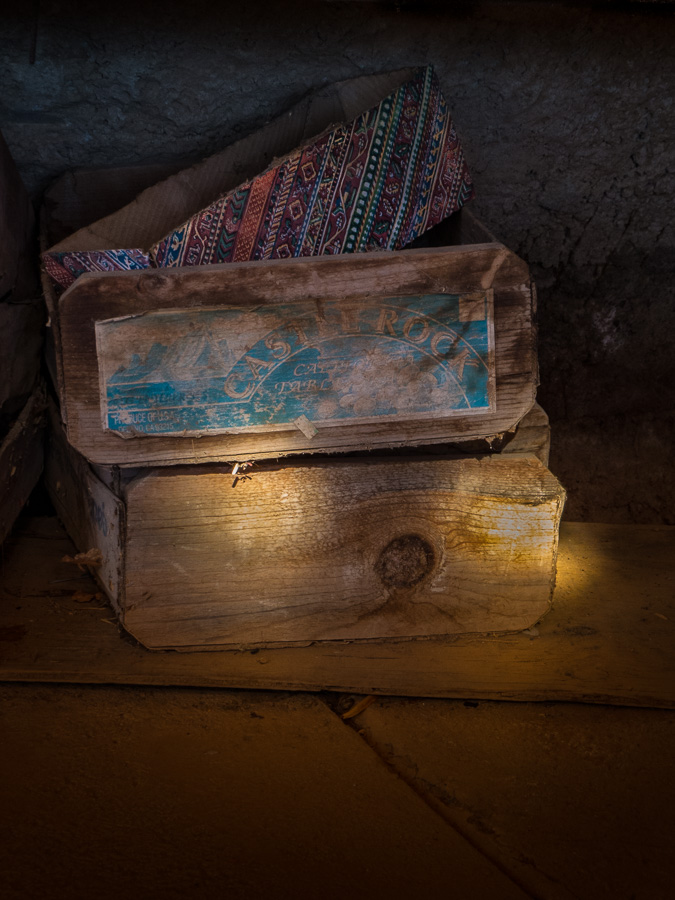
Beautiful decorative boxes near the forge at Cosanti Studios, Paradise Valley, AZ
Paolo Soleri was a master craftsman and excellent designer as well as bronze and ceramic artisan. While visiting his Paradise Valley, AZ (near Scottsdale) studio, Cosanti, I saw this small stack of wooden boxes which were almost hidden from view. They were near the area of the forge and the sun coming through the overhang created a certain mood that I was hoping to capture. I like the dark, subdued mood accented by the sun’s rays.
Click the link to read more about Cosanti. It is an interesting 20-30 minute visit if you are in the area.
Address: 6433 E Doubletree Ranch Rd, Paradise Valley, AZ 85253
All original content on this blog is copyrighted by Jeffrey B. Ross with ALL Rights Reserved. While reference links back to JBRish.comare appreciated and encouraged, please acquire approval for any reproduction of original content from this website.
Thousands and thousands of quotes delivered since 2011!
**********
All original content on this blog is copyrighted by Jeffrey B. Ross with ALL Rights Reserved. While reference links back to JBRish.comare appreciated and encouraged, please acquire approval for any reproduction of original content from this website.